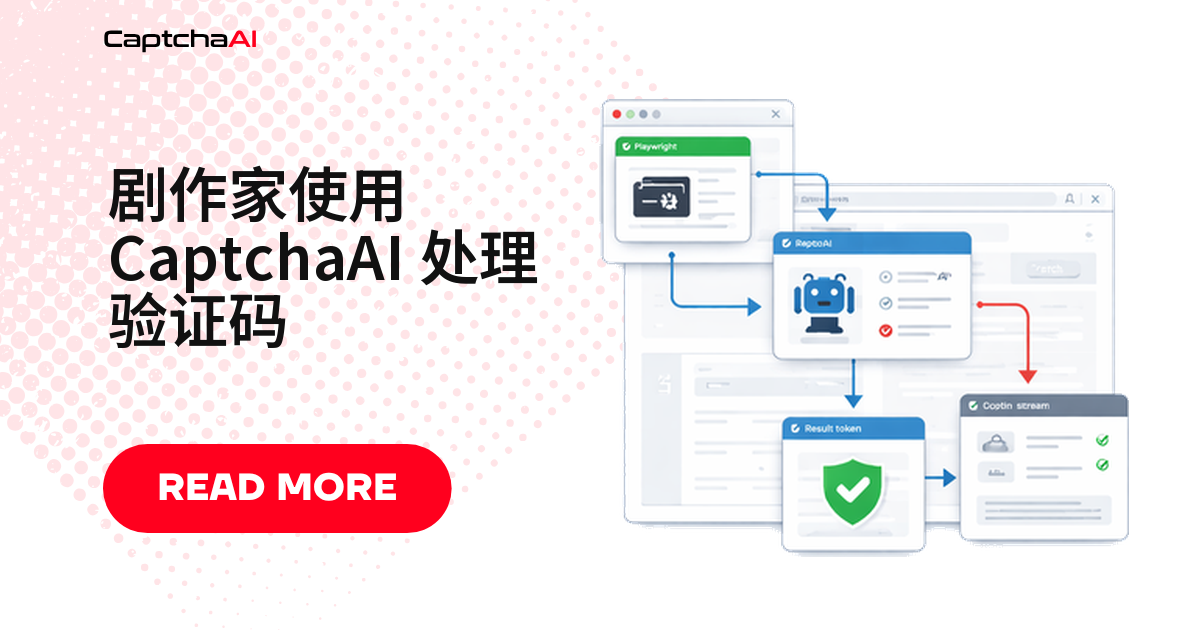
Playwright 本身不会识别验证码——脚本跑到 reCAPTCHA 或 Cloudflare Turnstile 页面时只能干等。真正完成识别的是 CaptchaAI:服务器端解出验证码,Playwright 只负责提取 sitekey、把 token 写回页面,两者配合就能让自动化流程稳定跑完验证码环节。
Playwright 验证码处理为什么离不开 CaptchaAI
Playwright 的自动等待解决"元素何时能点",不解决"验证码怎么过"。
国内站点常见 GeeTest(极验),reCAPTCHA、Turnstile 多见于海外站点;reCAPTCHA 需加载 Google 域名脚本,境内网络下常偏慢,不少团队因此直接用 CaptchaAI API 识别,减少对浏览器内交互式验证的依赖。
环境准备
- Python:
pip install playwright requests,然后执行playwright install - Node.js:
npm install playwright axios - CaptchaAI API Key:在 captchaai.com 注册后获取
Playwright、Selenium、Puppeteer 怎么选
三者接入 CaptchaAI 的方式一样——提取 sitekey、调用 API 识别、写回 token,选框架前先看清楚差异:
| 对比项 | Playwright | Selenium | Puppeteer |
|---|---|---|---|
| 支持语言 | Python、Node.js、C#、Java | Python、Java、C#、Ruby、JavaScript | Node.js |
| 支持浏览器 | Chromium、Firefox、WebKit | Chrome、Firefox、Edge、Safari | Chromium |
| 自动等待 | ✅ 内置 | ❌ 需手动等待 | ⚠️ 部分支持 |
| 网络拦截 | ✅ 支持 | ⚠️ 有限 | ✅ 支持 |
| CaptchaAI 集成 | ✅ 接口相同 | ✅ 接口相同 | ✅ 接口相同 |
下面以 Playwright 为例,看具体怎么接入。
Python 实战:Playwright + CaptchaAI 识别验证码
三步走:
- 封装识别函数——提交任务并轮询结果
- 完整登录示例——把 token 写回页面并提交表单
- 异步版本——并发处理多个页面
封装识别函数
向 CaptchaAI 提交任务,每隔几秒轮询一次结果:
from playwright.sync_api import sync_playwright
import requests
import time

API_KEY = "YOUR_API_KEY"

def solve_recaptcha(site_key, page_url):
    resp = requests.get("https://ocr.captchaai.com/in.php", params={
        "key": API_KEY,
        "method": "userrecaptcha",
        "googlekey": site_key,
        "pageurl": page_url
    })
    if not resp.text.startswith("OK|"):
        raise Exception(resp.text)
    task_id = resp.text.split("|")[1]

    for _ in range(60):
        time.sleep(5)
        result = requests.get("https://ocr.captchaai.com/res.php", params={
            "key": API_KEY, "action": "get", "id": task_id
        })
        if result.text == "CAPCHA_NOT_READY": continue
        if result.text.startswith("OK|"): return result.text.split("|")[1]
        raise Exception(result.text)
    raise TimeoutError()
完整登录示例
拿到 token 后写回页面元素,再提交表单:
def login_with_captcha(url, username, password):
    with sync_playwright() as p:
        browser = p.chromium.launch(headless=True)
        context = browser.new_context(
            user_agent="Mozilla/5.0 (Windows NT 10.0; Win64; x64) AppleWebKit/537.36"
        )
        page = context.new_page()
        page.goto(url)

        # Fill login form
        page.fill("#username", username)
        page.fill("#password", password)

        # Check for reCAPTCHA
        recaptcha = page.query_selector(".g-recaptcha")
        if recaptcha:
            site_key = recaptcha.get_attribute("data-sitekey")
            print(f"Solving reCAPTCHA: {site_key}")

            token = solve_recaptcha(site_key, page.url)

            # Inject token
            page.evaluate(f"""
                document.getElementById('g-recaptcha-response').innerHTML = '{token}';
                document.getElementById('g-recaptcha-response').style.display = '';
            """)

        # Submit
        page.click('button[type="submit"]')
        page.wait_for_load_state("networkidle")

        print(f"Current URL: {page.url}")
        content = page.content()

        browser.close()
        return content

result = login_with_captcha(
    "https://staging.example.com/qa-login",
    "[email protected]",
    "password123"
)
异步版本
并发处理多个页面时,用 aiohttp 替掉 requests:
from playwright.async_api import async_playwright
import aiohttp
import asyncio

async def solve_recaptcha_async(site_key, page_url):
    async with aiohttp.ClientSession() as session:
        params = {
            "key": API_KEY, "method": "userrecaptcha",
            "googlekey": site_key, "pageurl": page_url
        }
        async with session.get("https://ocr.captchaai.com/in.php", params=params) as resp:
            text = await resp.text()
            task_id = text.split("|")[1]

        for _ in range(60):
            await asyncio.sleep(5)
            params = {"key": API_KEY, "action": "get", "id": task_id}
            async with session.get("https://ocr.captchaai.com/res.php", params=params) as resp:
                text = await resp.text()
                if text == "CAPCHA_NOT_READY": continue
                if text.startswith("OK|"): return text.split("|")[1]
                raise Exception(text)
        raise TimeoutError()

async def main():
    async with async_playwright() as p:
        browser = await p.chromium.launch(headless=True)
        page = await browser.new_page()
        await page.goto("https://example.com/form")

        site_key = await page.get_attribute(".g-recaptcha", "data-sitekey")
        token = await solve_recaptcha_async(site_key, page.url)

        await page.evaluate(f"document.getElementById('g-recaptcha-response').innerHTML = '{token}'")
        await page.click('button[type="submit"]')
        await browser.close()

asyncio.run(main())
Node.js 实战:Playwright + CaptchaAI
思路一样,换成 axios 发请求:
const { chromium } = require("playwright");
const axios = require("axios");

const API_KEY = "YOUR_API_KEY";

async function solveRecaptcha(siteKey, pageUrl) {
  const submit = await axios.get("https://ocr.captchaai.com/in.php", {
    params: {
      key: API_KEY,
      method: "userrecaptcha",
      googlekey: siteKey,
      pageurl: pageUrl,
    },
  });
  const taskId = submit.data.split("|")[1];

  while (true) {
    await new Promise((r) => setTimeout(r, 5000));
    const result = await axios.get("https://ocr.captchaai.com/res.php", {
      params: { key: API_KEY, action: "get", id: taskId },
    });
    if (result.data === "CAPCHA_NOT_READY") continue;
    if (result.data.startsWith("OK|")) return result.data.split("|")[1];
    throw new Error(result.data);
  }
}

(async () => {
  const browser = await chromium.launch({ headless: true });
  const page = await browser.newPage();
  await page.goto("https://staging.example.com/qa-login");

  // Fill form
  await page.fill("#username", "[email protected]");
  await page.fill("#password", "password123");

  // Solve CAPTCHA
  const siteKey = await page.getAttribute(".g-recaptcha", "data-sitekey");
  if (siteKey) {
    const token = await solveRecaptcha(siteKey, page.url());
    await page.evaluate(
      (t) => (document.getElementById("g-recaptcha-response").innerHTML = t),
      token
    );
  }

  // Submit
  await page.click('button[type="submit"]');
  await page.waitForLoadState("networkidle");

  console.log("Logged in:", page.url());
  await browser.close();
})();
识别 Cloudflare Turnstile
检测和提交方式跟 reCAPTCHA 几乎一致,区别只在 method 参数换成 turnstile:
# Detect Turnstile
turnstile = page.query_selector(".cf-turnstile")
if turnstile:
    site_key = turnstile.get_attribute("data-sitekey")

    resp = requests.get("https://ocr.captchaai.com/in.php", params={
        "key": API_KEY, "method": "turnstile",
        "sitekey": site_key, "pageurl": page.url
    })
    task_id = resp.text.split("|")[1]

    # Poll and inject...
排查清单
page.query_selector返回 null:验证码异步加载,用page.wait_for_selector()等它出现后再取值- token 提交没生效:检查 response textarea 的实际 ID 是否一致
- Playwright 在 Docker 里跑不起来:缺浏览器依赖,执行
playwright install-deps补齐 - 识别通过后验证码又弹出来:站点可能要求触发回调,用
page.evaluate()手动执行一次
常见问题
Playwright 的自动等待能顺带把验证码解决掉吗?
不能,自动等待只保证元素出现后再操作,遇到验证码依旧要靠 CaptchaAI 的 API 才能解出。
CaptchaAI 支持 Playwright 会遇到的所有验证码类型吗?
覆盖大部分常见类型:reCAPTCHA v2/v3、Cloudflare Turnstile、GeeTest v3、图片/九宫格验证码,CaptchaFox、Friendly Captcha、Lemin(均为测试版)也支持。hCaptcha、FunCaptcha 暂不支持。
CaptchaAI 是按识别次数收费的吗?
不是,按并发线程计费。BASIC 计划 $15/月含 5 个线程,线程内识别次数不限;量大就换更高线程数的套餐,如 ADVANCE $90/月、50 线程。
Headless 模式下验证码出现的概率会不会更高?
会更高一些,这是网站反爬虫策略的正常现象,不代表脚本写错了。出现的验证码直接交给 CaptchaAI 识别即可。
相关指南
- 用 Python 处理 Selenium 验证码
- 用 Node.js 解决 Puppeteer 验证码
- 自动登录场景下的验证码处理