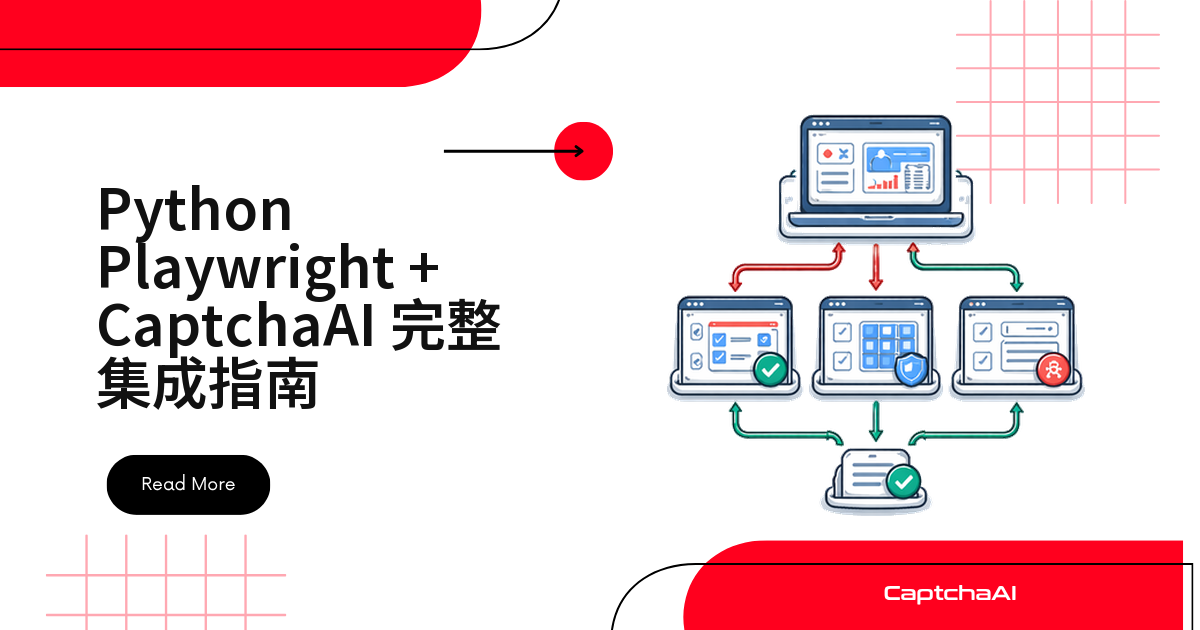
在 Playwright 自动化脚本里,卡住流程的常常不是页面元素,而是 reCAPTCHA、Turnstile 这类验证码——必须先拿到有效 token 才能继续。本文用 Python 异步 Playwright 配合 CaptchaAI 的 API,演示识别、求解、回填 token 到提交表单的完整流程,覆盖 reCAPTCHA v2、Cloudflare Turnstile 和图片验证码三种场景。
国内站点更常见 GeeTest(极验),reCAPTCHA、Turnstile 则多见于海外站点;测试环境访问不了 Google 的 reCAPTCHA 脚本时,也要留意这一点。本文示例思路同样适用于 GeeTest v3。
环境准备
pip install playwright aiohttp
playwright install chromium
如果 pip 下载慢,可以加清华源:pip install -i https://pypi.tuna.tsinghua.edu.cn/simple playwright aiohttp。
异步 CaptchaAI 求解函数
solve_captcha 是后面所有场景共用的核心函数:提交任务后每 5 秒轮询一次,拿到 token 就返回,超时会抛出异常。
import aiohttp
import asyncio

API_KEY = "YOUR_API_KEY"


async def solve_captcha(method, **params):
    """Async CaptchaAI solver for Playwright workflows."""
    async with aiohttp.ClientSession() as session:
        # Submit task
        submit_data = {
            "key": API_KEY,
            "method": method,
            "json": 1,
            **params,
        }
        async with session.post("https://ocr.captchaai.com/in.php", data=submit_data) as resp:
            data = await resp.json(content_type=None)
            if data.get("status") != 1:
                raise Exception(f"Submit error: {data.get('request')}")
            task_id = data["request"]

        # Poll for result
        for _ in range(30):
            await asyncio.sleep(5)
            async with session.get("https://ocr.captchaai.com/res.php", params={
                "key": API_KEY,
                "action": "get",
                "id": task_id,
                "json": 1,
            }) as resp:
                result = await resp.json(content_type=None)
                if result.get("status") == 1:
                    return result["request"]
                if result.get("request") == "ERROR_CAPTCHA_UNSOLVABLE":
                    raise Exception("CAPTCHA unsolvable")

        raise TimeoutError("Solve timed out")
创建 Playwright 浏览器实例
启动函数设置了常见的 User-Agent 和桌面 viewport,并用 add_init_script 写入初始化脚本,后面几个场景都复用这套浏览器实例。
from playwright.async_api import async_playwright


async def create_browser():
    """Launch Playwright browser with stealth-configuredion settings."""
    pw = await async_playwright().start()
    browser = await pw.chromium.launch(
        headless=False,
        args=[
            "--no-sandbox",
        ],
    )
    context = await browser.new_context(
        user_agent="Mozilla/5.0 (Windows NT 10.0; Win64; x64) AppleWebKit/537.36 "
                   "(KHTML, like Gecko) Chrome/120.0.0.0 Safari/537.36",
        viewport={"width": 1920, "height": 1080},
        locale="en-US",
    )

    # Remove Playwright detection signals
    await context.add_init_script("""
        Object.defineProperty(navigator, 'webdriver', {get: () => undefined});
        delete navigator.__proto__.webdriver;
    """)

    page = await context.new_page()
    return pw, browser, context, page
用 Playwright 识别 reCAPTCHA v2
这段代码从页面 HTML 里取出 sitekey,调用 CaptchaAI 拿到 token,写入 g-recaptcha-response 并触发页面回调,最后提交表单。
import re


async def solve_recaptcha_v2_playwright(page, url):
    """Complete reCAPTCHA v2 solve in Playwright."""
    await page.goto(url, wait_until="networkidle")

    # Extract sitekey from the page
    content = await page.content()
    match = re.search(r'data-sitekey=["\']([A-Za-z0-9_-]{40})["\']', content)
    if not match:
        raise ValueError("reCAPTCHA sitekey not found")

    sitekey = match.group(1)
    print(f"Sitekey: {sitekey}")

    # Solve via CaptchaAI
    token = await solve_captcha(
        "userrecaptcha",
        googlekey=sitekey,
        pageurl=url,
    )
    print(f"Token: {token[:50]}...")

    # Inject token
    await page.evaluate(f"""() => {{
        document.getElementById('g-recaptcha-response').value = '{token}';
        document.getElementById('g-recaptcha-response').style.display = 'block';
    }}""")

    # Trigger callback if available
    await page.evaluate(f"""() => {{
        if (typeof ___grecaptcha_cfg !== 'undefined') {{
            var clients = ___grecaptcha_cfg.clients;
            for (var key in clients) {{
                var client = clients[key];
                try {{
                    Object.keys(client).forEach(function(k) {{
                        if (client[k] && client[k].callback) {{
                            client[k].callback('{token}');
                        }}
                    }});
                }} catch(e) {{}}
            }}
        }}
    }}""")

    # Submit form
    await page.click("button[type='submit'], input[type='submit']")
    await page.wait_for_load_state("networkidle")

    return token
用 Playwright 识别 Cloudflare Turnstile
思路和 reCAPTCHA v2 类似:CaptchaAI 用 turnstile 方法处理,token 写入 cf-turnstile-response 隐藏字段。
async def solve_turnstile_playwright(page, url):
    """Complete Turnstile solve in Playwright."""
    await page.goto(url, wait_until="networkidle")

    content = await page.content()

    # Extract sitekey
    match = re.search(r'data-sitekey=["\']([0-9x][A-Za-z0-9_-]+)["\']', content)
    if not match:
        match = re.search(r"sitekey\s*:\s*['\"]([0-9x][A-Za-z0-9_-]+)['\"]", content)
    if not match:
        raise ValueError("Turnstile sitekey not found")

    sitekey = match.group(1)
    print(f"Turnstile sitekey: {sitekey}")

    # Solve via CaptchaAI
    token = await solve_captcha(
        "turnstile",
        sitekey=sitekey,
        pageurl=url,
    )

    # Inject token into hidden inputs
    await page.evaluate(f"""() => {{
        document.querySelectorAll('[name="cf-turnstile-response"]')
            .forEach(el => el.value = '{token}');
    }}""")

    # Submit
    await page.click("button[type='submit'], input[type='submit']")
    await page.wait_for_load_state("networkidle")

    return token
Playwright 中的图片验证码识别
直接截图验证码元素,转成 base64 提交给 CaptchaAI 的 base64 方法,识别结果填进输入框即可。
async def solve_image_captcha_playwright(page, captcha_selector):
    """Solve image CAPTCHA visible on the page."""
    captcha_element = page.locator(captcha_selector)

    # Screenshot the CAPTCHA image
    img_bytes = await captcha_element.screenshot()
    import base64
    img_base64 = base64.b64encode(img_bytes).decode()

    # Solve via CaptchaAI
    answer = await solve_captcha("base64", body=img_base64)
    print(f"Answer: {answer}")

    # Type the answer
    captcha_input = page.locator("input[name='captcha'], input[name='code'], input.captcha-input")
    await captcha_input.fill(answer)

    return answer
拦截网络请求提取验证码参数
用 Playwright 的请求拦截抓取验证码相关接口里的 sitekey 等参数:
async def intercept_captcha_params(page, url):
    """Intercept network requests to find CAPTCHA parameters."""
    captcha_params = {}

    async def handle_request(route, request):
        if "recaptcha" in request.url or "turnstile" in request.url:
            from urllib.parse import urlparse, parse_qs
            parsed = urlparse(request.url)
            params = parse_qs(parsed.query)
            captcha_params.update(params)
            print(f"Intercepted: {request.url}")
        await route.continue_()

    await page.route("**/*", handle_request)
    await page.goto(url, wait_until="networkidle")
    await page.unroute("**/*")

    return captcha_params
封装完整的自动化类
把前面代码整合成 PlaywrightCaptchaSolver 类:detect_captcha 判断验证码类型,_api_solve 统一调用 CaptchaAI,solve_and_submit 跑完检测到提交的全流程。
import re
import asyncio
import aiohttp
import base64
from playwright.async_api import async_playwright


API_KEY = "YOUR_API_KEY"


class PlaywrightCaptchaSolver:
    """Complete Playwright + CaptchaAI automation class."""

    def __init__(self, api_key, headless=False):
        self.api_key = api_key
        self.headless = headless
        self.pw = None
        self.browser = None
        self.context = None
        self.page = None

    async def start(self):
        """Initialize the browser."""
        self.pw = await async_playwright().start()
        self.browser = await self.pw.chromium.launch(
            headless=self.headless,
            args=["--no-sandbox"],
        )
        self.context = await self.browser.new_context(
            user_agent="Mozilla/5.0 (Windows NT 10.0; Win64; x64) AppleWebKit/537.36 "
                       "(KHTML, like Gecko) Chrome/120.0.0.0 Safari/537.36",
            viewport={"width": 1920, "height": 1080},
        )
        await self.context.add_init_script(
            "Object.defineProperty(navigator, 'webdriver', {get: () => undefined})"
        )
        self.page = await self.context.new_page()

    async def stop(self):
        """Close the browser."""
        if self.browser:
            await self.browser.close()
        if self.pw:
            await self.pw.stop()

    async def navigate(self, url):
        """Navigate and wait for page to load."""
        await self.page.goto(url, wait_until="networkidle")

    async def detect_captcha(self):
        """Detect which CAPTCHA type is present."""
        content = await self.page.content()

        if re.search(r'data-sitekey=["\'][A-Za-z0-9_-]{40}["\']', content):
            if "recaptcha" in content.lower():
                return "recaptcha_v2"

        if "cf-turnstile" in content or "challenges.cloudflare.com/turnstile" in content:
            return "turnstile"

        if re.search(r"render=[A-Za-z0-9_-]{40}", content):
            return "recaptcha_v3"

        img_count = await self.page.locator(
            "img.captcha, img[alt*='captcha'], img[src*='captcha']"
        ).count()
        if img_count > 0:
            return "image"

        return None

    async def solve_and_submit(self, url, form_data=None):
        """Full workflow: navigate, detect, solve, fill, submit."""
        await self.navigate(url)
        captcha_type = await self.detect_captcha()

        if captcha_type:
            print(f"Detected: {captcha_type}")
            await self._solve(captcha_type)

        if form_data:
            for name, value in form_data.items():
                try:
                    await self.page.fill(f"[name='{name}']", value)
                except Exception:
                    pass

        await self.page.click("button[type='submit'], input[type='submit']")
        await self.page.wait_for_load_state("networkidle")
        return self.page.url

    async def _solve(self, captcha_type):
        content = await self.page.content()
        url = self.page.url

        if captcha_type == "recaptcha_v2":
            match = re.search(r'data-sitekey=["\']([A-Za-z0-9_-]{40})["\']', content)
            token = await self._api_solve("userrecaptcha", googlekey=match.group(1), pageurl=url)
            await self.page.evaluate(f"""() => {{
                document.getElementById('g-recaptcha-response').value = '{token}';
            }}""")

        elif captcha_type == "turnstile":
            match = re.search(r'data-sitekey=["\']([0-9x][A-Za-z0-9_-]+)["\']', content)
            token = await self._api_solve("turnstile", sitekey=match.group(1), pageurl=url)
            await self.page.evaluate(f"""() => {{
                document.querySelectorAll('[name="cf-turnstile-response"]')
                    .forEach(el => el.value = '{token}');
            }}""")

        elif captcha_type == "image":
            img = self.page.locator("img.captcha, img[alt*='captcha'], img[src*='captcha']").first
            img_bytes = await img.screenshot()
            answer = await self._api_solve("base64", body=base64.b64encode(img_bytes).decode())
            await self.page.fill("input[name='captcha'], input[name='code']", answer)

    async def _api_solve(self, method, **params):
        async with aiohttp.ClientSession() as session:
            async with session.post("https://ocr.captchaai.com/in.php", data={
                "key": self.api_key, "method": method, "json": 1, **params,
            }) as resp:
                data = await resp.json(content_type=None)
                if data.get("status") != 1:
                    raise Exception(f"Submit error: {data.get('request')}")
                task_id = data["request"]

            for _ in range(30):
                await asyncio.sleep(5)
                async with session.get("https://ocr.captchaai.com/res.php", params={
                    "key": self.api_key, "action": "get", "id": task_id, "json": 1,
                }) as resp:
                    result = await resp.json(content_type=None)
                    if result.get("status") == 1:
                        return result["request"]
            raise TimeoutError("Solve timed out")


# Usage
async def main():
    solver = PlaywrightCaptchaSolver(API_KEY)
    await solver.start()
    try:
        result = await solver.solve_and_submit(
            "https://staging.example.com/qa-login",
            form_data={"email": "[email protected]", "password": "pass123"},
        )
        print(f"Result: {result}")
    finally:
        await solver.stop()


asyncio.run(main())
Playwright 与 Selenium 处理验证码:怎么选
两者都能配合 CaptchaAI 使用,但工程体验差别不小:
| 特性 | Playwright | Selenium |
|---|---|---|
| 异步原生支持 | 支持 | 不支持(需要额外开线程) |
| 默认配置 | 开箱即用体验更好 | 需要更多手动配置 |
| 执行速度 | 更快 | 页面加载普遍更慢 |
| 请求拦截 | 内置支持 | 需要代理或扩展 |
| 多浏览器支持 | Chromium、Firefox、WebKit | Chrome、Firefox、Edge、Safari |
| API 风格 | 基于 Promise,更现代 | 命令式,偏传统 |
新项目优先选 Playwright,老 Selenium 代码库没必要为此重写。
常见故障排查
| 症状 | 原因 | 处理方式 |
|---|---|---|
page.evaluate 执行失败 |
页面内容尚未加载完成 | 改用 wait_until="networkidle" |
| token 提交后没有效果 | 元素选择器不对 | 用 page.content() 检查页面实际结构 |
| Playwright 被检测出自动化特征 | 缺少初始化脚本 | 在 add_init_script 中补上 webdriver 相关覆盖 |
networkidle 一直超时 |
页面存在持续轮询的脚本 | 改用 wait_until="domcontentloaded" |
| 截图为空白 | 元素处于隐藏状态 | 先滚动到可见区域:await element.scroll_into_view_if_needed() |
常见问题
GeeTest v4 现在能用 CaptchaAI 识别吗?
目前不支持,官方状态是“即将支持”。CaptchaAI 目前支持的是 GeeTest v3(geetest 方法),接入前先确认目标站点用的是哪个版本。
token 提交之后表单还是没通过,是哪里出了问题?
先用 page.content() 确认隐藏字段的 name/id 是否和代码一致,再检查页面是否需要额外触发一次回调(reCAPTCHA v2 常见)。
Playwright 无头模式会影响 CaptchaAI 的识别结果吗?
不会,CaptchaAI 在自己的基础设施上完成识别。但部分目标站点会针对无头模式做检测,建议两种模式都测一遍。
轮询了 30 次还没拿到结果要怎么办?
轮询是每 5 秒一次、最多 30 次,约 150 秒后抛出 TimeoutError。先确认 method 和参数是否正确,再按验证码类型调整轮询次数。
总结
Python Playwright 配合 CaptchaAI 的 API,能把 reCAPTCHA v2、Turnstile 和图片验证码的识别流程收进同一套异步代码。复用 PlaywrightCaptchaSolver 类即可拿到检测、识别、填表、提交的完整工作流。